
AI去路人去雜物指令:remove objects from photo prompt實測好用的10條
這張圖為什麼發出去總有人問"背景那個人是誰"?十有八九是路人沒處理乾淨。最近後臺問得最多的一類需求,不是怎麼生成新圖,是怎麼把已經拍好的照片裡那些不想要的東西弄掉——路人、水印、地上的電線、桌上的雜物。工具早就夠用了,卡的是提示詞沒寫對,remove objects from photo prompt這件事,十個人裡有八個第一次寫都會翻車。
remove objects from photo prompt 為什麼總留痕跡
最常見的錯法是隻寫一句"去掉背景裡的人",模型確實會執行刪除,但刪除之後空出來的那塊區域怎麼填,你沒說,它就自己猜,猜錯了就是一塊顏色不對、紋理斷掉的補丁,一眼假。真正管用的寫法要把"填補邏輯"也交代清楚:刪了之後地面紋理怎麼延續、陰影方向跟著哪個光源走。這跟舊照片修復的思路是一回事,可以對照看看老照片修復怎麼保住顆粒質感裡提到的填補原則。
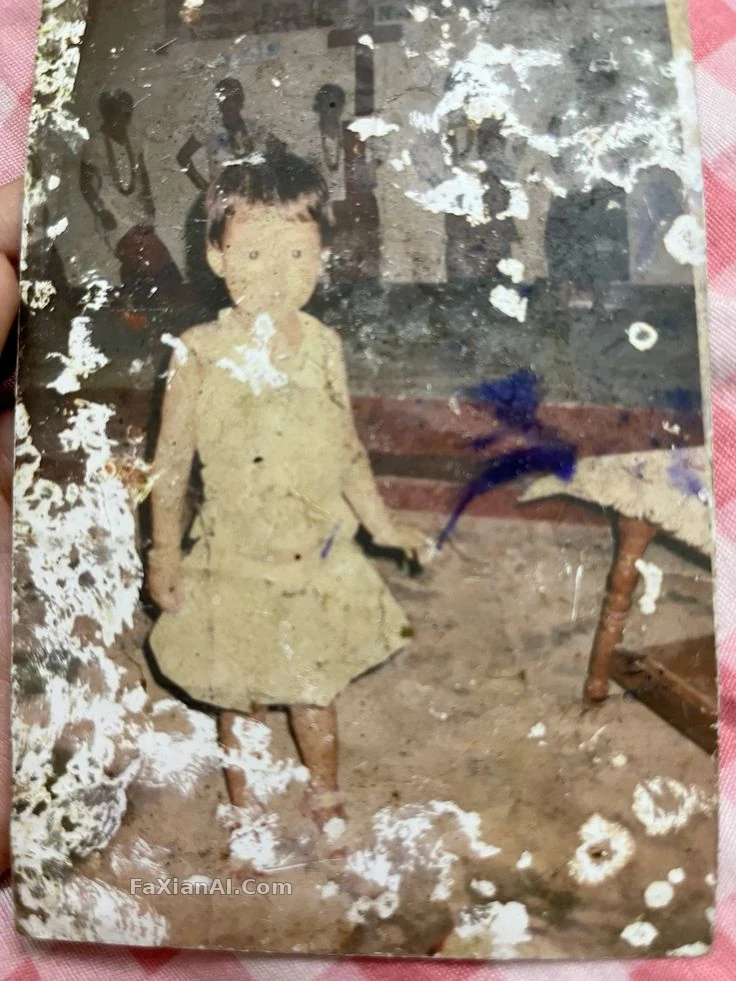
這張是劃痕修復的案例,邏輯跟去雜物是通的——刪掉的不只是"髒東西"本身,還要把它原來佔的位置合理地長回來,檢視完整提示詞。
以下是幾條針對不同場景寫好的提示詞,直接改主體描述就能用:
- Remove the passerby standing behind the bench on the right, rebuild the pavement texture and shadow direction to match the surrounding light, keep everything else pixel-identical.
- Erase the tourist crowd in the mid-ground behind the subject, extend the stone wall pattern naturally to fill the gap, do not alter the subject's pose or clothing.
- Remove the second person standing at the edge of the frame, do not crop the composition, extend the background instead of cutting the canvas.
- Erase the reflection of the photographer visible in the mirror, keep the mirror frame and surrounding wall color untouched.
chatgpt remove background objects 處理產品圖和雜物
產品圖和生活照的雜物清理,跟去路人的底層邏輯一樣,但對"乾淨"的要求更高,chatgpt remove background objects這個需求下,背景稍微留一點色差都會被挑出來。產品類的圖尤其要注意,刪掉的東西如果帶反光或投影,新填的背景也得跟著有對應的光影邏輯,不然產品看著像浮在半空。這塊可以對照電商產品圖換背景的提示詞思路一起用。
純白背景類的產品圖對"乾淨"的容錯率最低,任何雜物殘留都藏不住,檢視完整提示詞。
- Delete the small logo watermark in the bottom-right corner, reconstruct the underlying fabric texture at that spot, keep color grading unchanged.
- Remove the cable and power strip visible on the studio floor, fill with matching floor material and consistent lighting falloff.
- Remove the price tag sticker and any visible barcode on the product packaging, reconstruct the packaging surface pattern seamlessly.
- Clean up the scattered paper clutter on the desk except the laptop and coffee cup, keep desk wood grain direction consistent after fill.
- Delete the birds in the sky and the utility pole on the left, keep the sky gradient and cloud shapes consistent with the rest of the frame.
remove people from photo ai prompt 去路人專項:分批比一次到位穩
去一群人的場景,remove people from photo ai prompt這類需求最容易犯的錯是貪心,想一次把一整片人群全刪掉。人多的時候背景的補全難度是疊加的,一次刪太多,出了問題都不知道是哪一步塌的。穩妥的做法是分批處理:先刪離主體最近、最顯眼的一兩個,看結果穩不穩,再繼續。
分步處理不只是去人,降噪、虛化這類需求也一樣講究先後順序,檢視完整提示詞。
- Remove all bystanders from the street scene one at a time, starting with the person closest to the subject, keep street lines and shadows continuous after each removal.
多人場景刪完一輪,記得回頭檢查一下陰影方向有沒有互相矛盾——兩個被刪的人如果原本陰影朝不同方向,填補的時候很容易被模型統一成一個方向,反而露餡。
還有一個小細節容易被忽略:刪除的物件如果本身帶陰影或者反光,光刪主體不刪它的影子,畫面還是會露餡。比如去掉一個人,但地上那道屬於這個人的陰影沒提,模型有可能把陰影留在原地,變成一塊沒有主體的詭異暗色區域。提示詞裡把"連帶陰影和反光一起處理"這句話寫進去,能省掉很多返工。
常見翻車點小結
- 只說"刪掉"不說"怎麼補",等於把填補邏輯的判斷權全交給模型,出錯率最高
- 複合需求(去路人+換背景一起做)建議拆成兩步,先刪乾淨再換背景,一步出錯不好定位
- 產品圖對背景乾淨度要求更高,刪除後建議重點檢查陰影和反光是否跟場景光源對上
- 想同時處理"去路人"和"換背景",可以先參考背景替換提示詞的寫法把兩件事分開描述
想再深挖提示詞的通用寫法,可以看看提示詞結構公式,去雜物這類刪除類需求本質上也是往結構里加一段"填補描述"。更多修圖改圖相關的實操內容,歡迎去首頁翻一翻其他分類。