Home › Photo Editing › 01:16 — Welding a Photo Into a Lock-Screen Mockup
01:16 — Welding a Photo Into a Lock-Screen Mockup
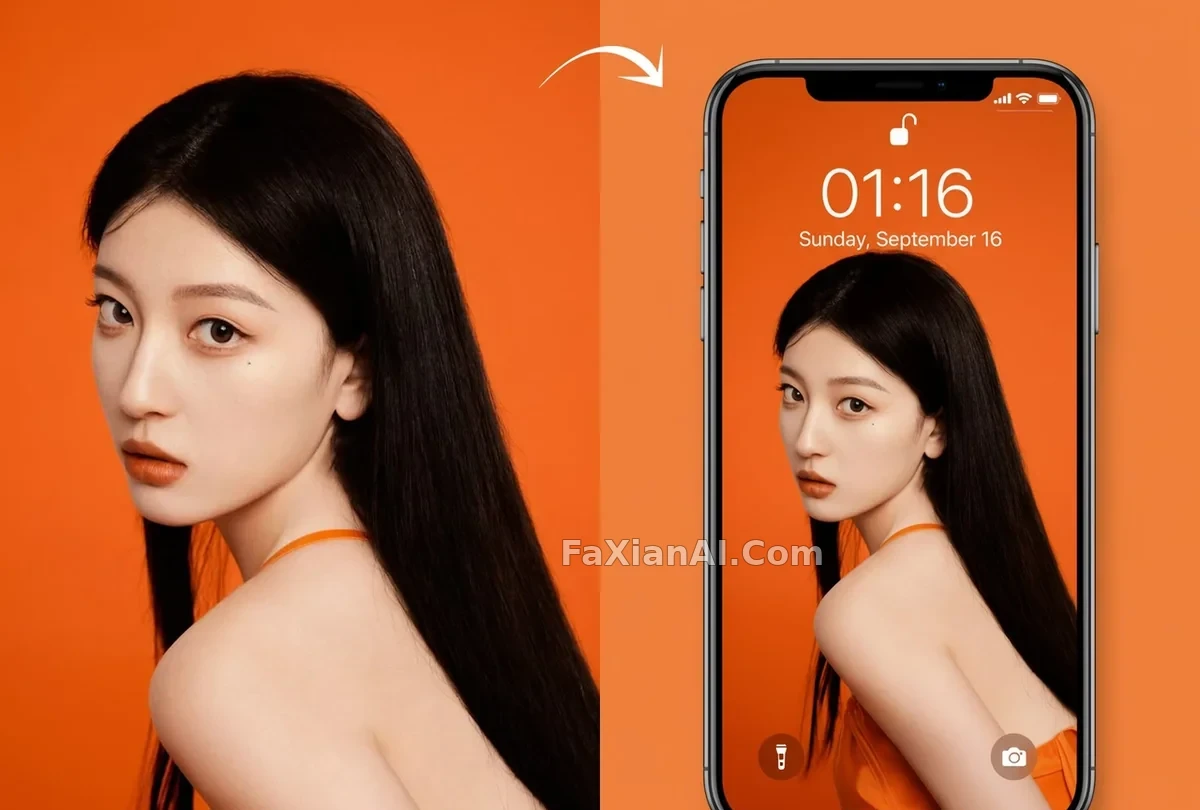
Stack on the status bar, match a phone case, and any casual photo instantly becomes a lock-screen mockup.
✍️ Whether the numbers 01:16 read as a real device is the only variable worth touching. Pinning the flashlight and camera icons to the bottom is just how the lock-screen format works — swap in a different time and the same formula still applies.
📋 Prompt Natural Language
Turn the source photo into an iPhone lock-screen mockup. Overlay the on-screen clock reading 01:16, the date line Sunday, September 16, and the usual status-bar icons — battery, signal, and the rest — across the top, with the flashlight and camera shortcuts anchored at the bottom edge. Recompose the original image to fill the tall, elongated phone-screen aspect ratio, then set the phone itself against a backdrop pulled from the same color palette as the photo.